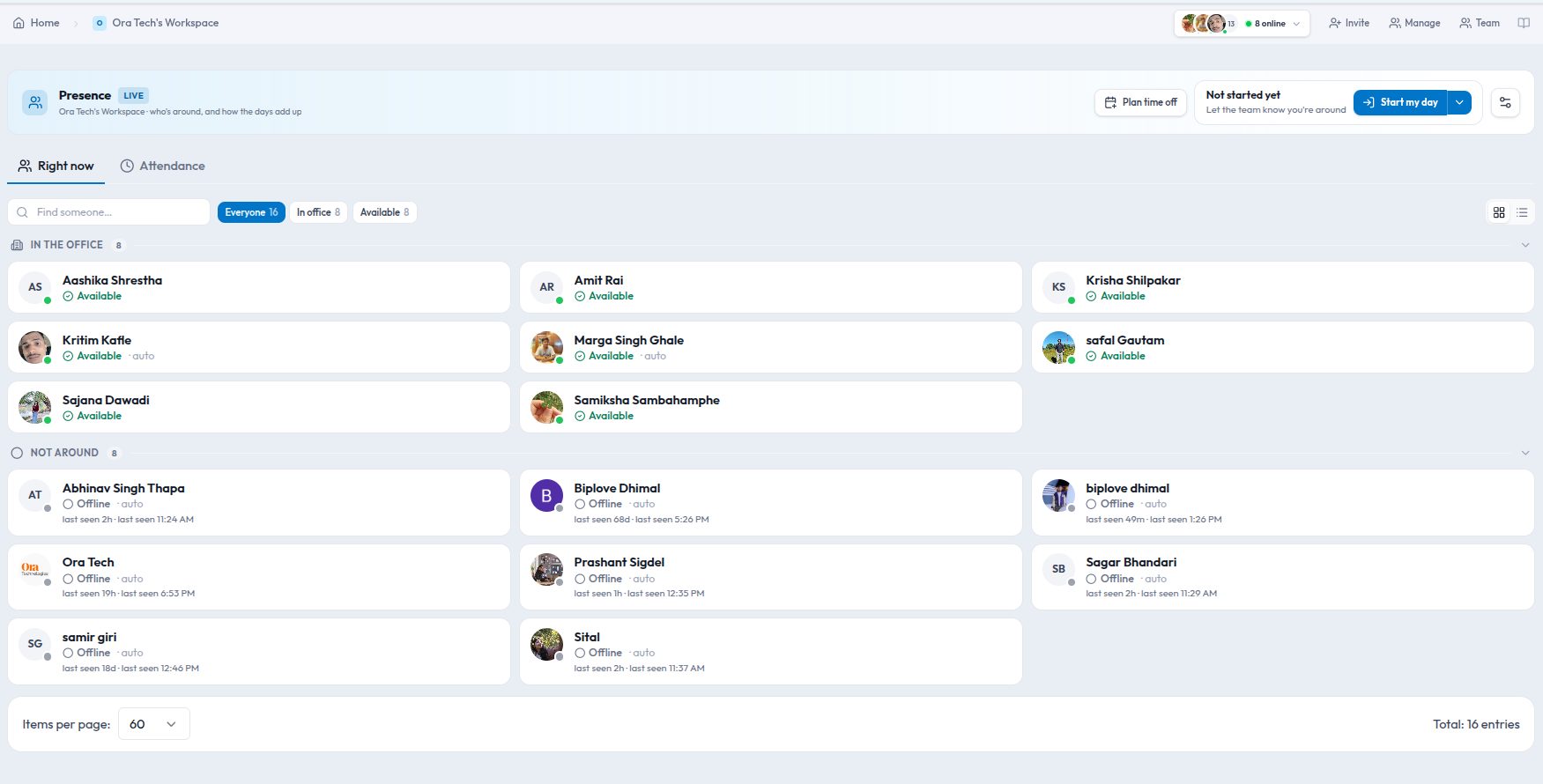
Every team tool has a status dot, and every team has learned to ignore it. Green means "logged in at some point today". Red means "clicked Busy in March". When you actually need to know whether you can interrupt someone, you walk over, or you send the message anyway and hope.
We built Presence in Kydero to answer three questions at a glance: who is around, where they are, and, if they cannot be reached, why. This post walks through how it works, what it works out on its own, and how the same signals become an attendance sheet you can trust.
A reason travels with the status
Pick a status from your avatar menu and Kydero asks why. For some statuses the answer is optional. For the ones where a colleague genuinely needs more, it is required: In a meeting, On a client call, Stepped out, On leave. Admins decide which statuses demand a reason.
So instead of a dead end, the team sees On a client call · Acme contract review · back at 3:00. That is enough to decide whether to wait, to write, or to ask someone else.
Statuses expire
Nobody is still at lunch on Monday morning. Every status arrives with a sensible Clear after value. Lunch clears itself in an hour, Focus stays open until you say otherwise, and you can override either. The result is a board that reflects the present, not the last time someone remembered to click.
Where you are is a separate question
Where you are and whether you can be interrupted are different things, so Kydero keeps them apart. Office, remote, or at a client is a sticky setting you choose once. Your status changes through the day; your location does not need to.
The system fills in the blanks, and says so
If you never touch the dropdown, Kydero works out what you are doing from signals it already has, and labels the guess with an AUTO tag so nobody mistakes it for something you said.
| Your team sees | Because |
|---|---|
| Focused · KYD-88 | You have a task timer running on the Scrum board |
| Available | You are connected and active |
| Idle · no activity for 20m | Connected, but nothing has happened for a while |
| Offline · last seen 6:10 PM | No connection |
| Done for the day | You ended your day |
| On leave · back Sep 8 | You booked those dates |
| Public holiday · Dashain | It is a workspace holiday on the office calendar |
The rule that makes this trustworthy is simple: anything you set yourself beats anything automatic. Once you say "On a client call until 3", a sleeping laptop, a stopped timer, or a reconnect cannot move you off it. Two things sit above your choice on purpose: booked leave and a company holiday, because those should win over a status you forgot to clear last Friday. And if you are the person on the roster during a holiday, setting a status that day marks you as on duty.
How it connects to the rest of Kydero
- Task timers. Start a timer on a task and your status becomes Focused with the task key attached. Stop it and the status falls back to whatever the next signal says.
- Office calendar. Workspace holidays and booked time off come from the calendar you already keep, so a public holiday shows for everyone on the right local day, not a day early because the server lives in another timezone.
- Everywhere people appear. The same resolved status shows on the team board, in hover cards, and next to your avatar across the app, so there is one answer, not three.
- Workspace scoped. A workspace is a company. Your status in one workspace never leaks into another.
Attendance that separates "at work" from "tracked"
Task timers were never attendance. Meetings, email, planning and mentoring produce no timer rows, and a report built on timers would read them as absence. So Presence has a proper day: you start it, you end it, and if you forget, a sweeper closes it in the evening and flags it as automatic. Overtime is safe. The sweeper never cuts off someone who is still active, and a late leaver who forgot to check out is closed at their last activity, not clipped to the closing hour.
The Attendance tab then shows, per person and date range:
- At work: time between start and end of day.
- Tracked: time logged against tasks.
- Untracked: the difference, and what share of working time was tracked.
- Office / Remote: how the days split.
Untracked is not idle time. It is real work without a ticket. Treat the percentage as a coverage figure for timer discipline, never as a productivity score. Breaks are handled honestly too: a lunch status is subtracted as break time, a meeting is not, and the tracked share is measured against working time, so a lunch does not count as time you failed to log.
The day as a timeline
Storage keeps what someone is. Presence also logs what they did, so "lunch 12:30 to 13:15" is still answerable tomorrow. Renaming a status later does not rewrite history, because each entry keeps the label it had at the time.
For admins
- Your words, not ours. Rename, recolour, reorder or hide any status, or add your own. A clinic uses On rounds, an agency On shoot, a school Teaching. Each status belongs to one of five groups, Available, Busy, Away, Off, Offline, and the groups are what drive the board.
- Fix a day. End someone's day now if they left with a browser still open, or record a day for someone who never checked in. Corrections are stored as admin corrections, so recorded time never masquerades as self-reported time.
- Settings. Workspace timezone, idle threshold, auto-close hour, whether check-in is on at all, and whether peers see reasons or only managers do.
Who sees what
Presence is for everyone, because knowing who is around is the point. Attendance and the day timeline are for owners and admins, and a member always sees their own row. Reasons can be limited to managers with one switch, so "Away · dentist" becomes plain "Away" for peers.
Find it under Presence in the sidebar, next to Team, or from your avatar menu anywhere in Kydero.