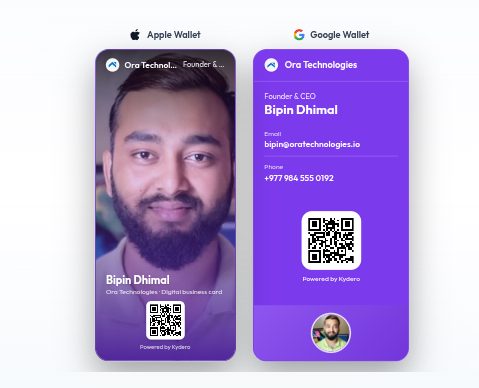
One person with a digital card is a nice trick. A whole team with digital cards is an operational change, and it is the point at which most companies discover why paper was quietly costing them. Someone changes title and forty boxes go stale. The new hire waits two weeks for print. Half the team designed their own card in a different shade of the brand colour. And nobody, ever, knows which card led to which deal.
This guide covers how we roll Kydero cards out across a team, what to decide before you start, and what to look at once it is running.
Decide three things first
1. Who owns the design
Every Kydero card carries a brand logo, a brand colour and one of three wallet designs (Aurora, Spotlight or Meridian). Pick all three once, usually marketing or whoever owns the brand, and apply the same trio to every card you issue. Individuals fill in their details, not their aesthetics. Decide this before the first card exists; it is far easier than correcting thirty cards later.
2. Where captures should land
Every card points at a pipeline. Before you issue cards, sketch the routing: sales cards into the sales pipeline, recruiters' cards into candidates, a partnerships card into its own lane. Set the default at the workspace level and override it on the handful of cards that need something different. Doing this first means the CRM sorts itself from day one.
3. Which fields are required
A card with a phone number and no email, or a photo that is a logo, looks unfinished. Agree the minimum: photo, name, title, work phone, email. Kydero shows those on the card, in the downloadable contact file, and on both wallet passes, so a gap shows up in three places.
Issue the cards
Each person gets a card under Cards in the workspace. The card carries their public page link, a QR code, and the Apple and Google Wallet passes. Ask everyone to do two things on day one:
Add their own card to their phone's wallet, so it is there at the next event without hunting for a link.
Put the QR code in their email signature. That one placement generates more scans than most events do, because every email they send becomes a card hand-over.
For people who meet clients where the signal is bad, mention the offline pass. Its QR code carries the contact details directly, so a scan works with no network at all.
Keep them current without doing anything
This is the part that pays for the rollout. When someone is promoted, edits their title, or gets a new number, they change it once in Kydero. Their page updates immediately. Every wallet pass that anyone ever added, theirs or a client's, updates itself. Nothing is reprinted and nothing is re-sent.
If the brand changes, a new logo or a new colour, update the cards and use Refresh wallet passes on the Cards page. It pushes the new design to every issued pass in one go.
What happens to a capture
When a stranger fills in the form on a team member's card, the capture lands in the CRM with the card as its source. Two rules keep the pipeline clean:
Name and email with no message become a contact, not a lead. They are on the contacts board with a promote button, and they do not inflate anyone's pipeline.
Anything with a message, or a capture from a card in event mode, becomes a lead in the card's pipeline, with the card recorded as its source.
Because the capture arrives with its source attached, the follow-up already belongs to whoever owns that card. There is no shared inbox to triage and no "who met this person?" thread.
See which cards work
Paper gives you nothing back. Digital cards give you the number that matters: which cards are actually bringing people in. Each card shows its page views and captures. Over a quarter, that tells you which events were worth attending, which people's signatures are pulling weight, and whether the trade-show budget is doing anything. It is the same argument you would make for a landing page, applied to the thing your team hands out every day.
A rollout checklist
Choose the wallet design, brand colour and logo every card will use.
Set the default intake pipeline; override on cards that need a different lane.
Create one card per person with photo, title, work phone and email.
Everyone adds their own pass to their wallet.
Everyone puts their QR code in their email signature.
Book a fifteen-minute session for people who go to events: standard pass, offline pass, how to show it fast.
Review card analytics at the end of the first month.
The whole thing takes an afternoon for a team of thirty. The last box of paper cards you ordered took longer than that to arrive.