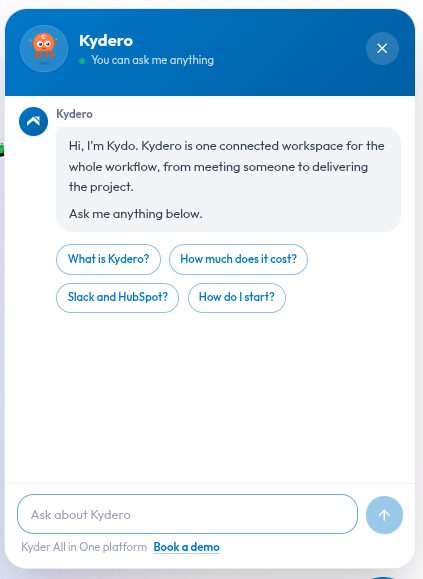
There are two normal ways to find out whether a product fits your team. You read the marketing pages and try to piece an answer together from six of them. Or you fill in a form, wait a day, and get an email from someone whose job is to book a call.
Neither is a good use of your afternoon. So we built a third option into the site: an assistant called Kydo that answers the question you actually have, in the moment you have it.
Click the button in the bottom-right corner of any page. No account, no email address, no form.
What it can answer
Kydo is built on Kydero's own public documentation, so it is good at the kind of question that is otherwise scattered across a site:
- What is this, exactly? Kydero is one workspace holding three products: Card for digital business cards shared by QR code, NFC tap or link; CRM for leads, pipelines and follow-ups; and Scrum for sprints, tasks and boards. Ask how they connect and it will explain that a card exchange can become a lead, and a won deal can become a project.
- What does it cost? Kydero is in a free beta. Nothing to pay, no credit card, no tiers. Kydo says so in one sentence rather than routing you to a pricing page that does not exist yet.
- Does it work with what we already use? Ask about Slack, HubSpot, Google Calendar or GitHub and it will tell you what each integration actually does.
- Which part do I need? Tell it your team size and what you do, and it will suggest where to start rather than selling you all three.
Answers arrive in a couple of seconds, and they are written as prose, not as a wall of links.
It shows its work
Under most answers you will see a short row of links labelled "Based on". Those are the pages the answer came from. Click one and read the source yourself.
This matters more than it sounds. An assistant that produces confident paragraphs with nothing behind them is asking you to take its word. Showing the source lets you check, and it keeps us honest about whether our own documentation actually says what the assistant claims.
Where it stops, on purpose
A support assistant that pretends to know everything is worse than no assistant at all, because you cannot tell which answers to trust. Kydo has three hard limits, and it states them rather than guessing.
It cannot see your account
Ask whether your data is secure, what your team used last month, or why a particular lead is not showing, and it will tell you that this is specific to your workspace and that it cannot see account data from where it sits. Then it points you at where the answer actually lives, inside the product. It has no access to any workspace, which is exactly what you want from something running on a public marketing page.
It will not take your credentials
If you paste something that looks like a password, a token or a verification code, Kydo stops and tells you to change it. Anything typed into a chat box should be treated as exposed. It cannot use a credential for anything, and it will not pretend otherwise to seem helpful.
It stays on topic
Ask it who won the World Cup and it will politely say it is here for questions about Kydero. We would rather it decline than confidently answer something it has no business answering.
It forgets you
The conversation follows you around the site, so you can ask something on the home page, click through to the features page, and pick up where you left off. Close the tab and it is gone.
Nothing is tied to an account, because there is no account. We are not building a profile of you out of the questions you asked before you signed up.
When you want a person
Some questions should not be answered by software. Anything about a contract, a migration from your current tools, or a specific commitment for your team deserves a conversation with someone who can make that commitment.
So the assistant carries a "Book a demo" link at all times, and it is not a consolation prize for when the bot fails. If a real conversation is the right answer to your question, take it.
Honest about the rest
Two things worth saying plainly.
First, it can be wrong. It is built on a language model reading our documentation, and that combination gets things subtly off sometimes. The source links under each answer exist so you can check anything that matters before you act on it.
Second, it only knows what our public documentation knows. Ask about something we have not written up yet and it will say so instead of inventing a feature. If it tells you a feature does not exist and you think it should, that is useful feedback for us either way.
Go and try to catch it out. The button is in the corner.